
Open Brain: Building a Personal Knowledge Backend with AI
How I built a vault-first personal knowledge system using AI tools, Obsidian, and open-source components — where every piece is swappable.
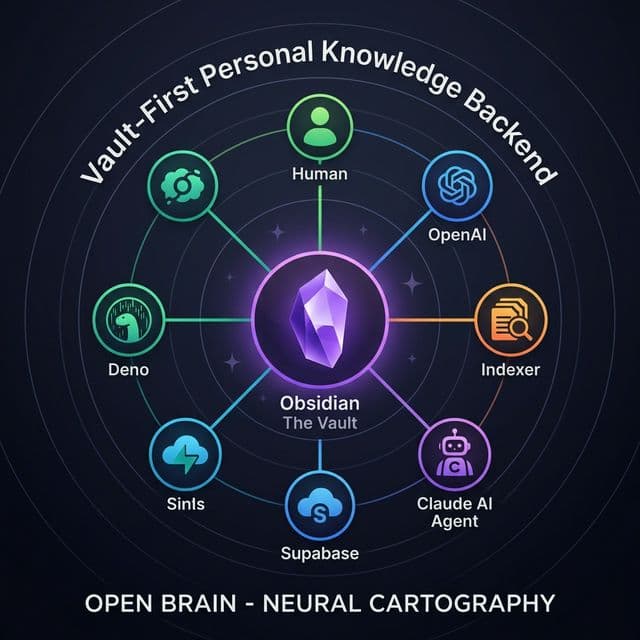
Open Brain: Building a Personal Knowledge Backend with AI
What if your notes could think?
Not in a sci-fi way — but in a practical, "I wrote something three months ago that's relevant to what I'm working on today, and the system surfaces it automatically" kind of way.
That's the problem I set out to solve. As a UX designer working with AI daily, I had accumulated hundreds of notes across Obsidian, NotebookLM, messaging platforms, and AI coding sessions. Good notes. Notes that contained real insights, architectural decisions, and patterns I'd figured out the hard way.
The problem? They were invisible to each other.
The Challenge
Every knowledge worker faces the same trap: the more tools you use, the more fragmented your knowledge becomes. Your AI assistant doesn't know what you wrote in your notebook. Your notebook doesn't know what you discussed on chat. Your project files don't reference your research notes.
The irony: I was using AI to build products for others while my own knowledge system was essentially a collection of disconnected filing cabinets.
I needed a system where my notes weren't just stored — they were queryable, connected, and useful to AI agents that could help me think, write, and build.
The Solution
Open Brain is a vault-first personal knowledge backend. Think of it as the engine behind your notes — it makes your markdown files machine-readable without replacing them.
The core idea is deliberately simple: your Obsidian vault (or any folder of markdown files) stays as the single source of truth. You keep writing notes the way you always have. Open Brain sits behind that vault, creating a searchable, queryable mirror that AI agents can use to help you work.
Here's why that distinction matters: most "second brain" tools want you to move your thinking into their system. Open Brain takes the opposite approach. Your files stay yours. The database is just a derived projection — a lens through which AI can see your knowledge. If the database goes down, your notes are still there, perfectly readable.
This isn't a product you buy. It's a system you assemble from open-source and free-tier tools, configured to your workflow. Every component — the database, the embedding model, the AI interface — can be swapped out independently. No vendor lock-in. No black boxes.
The Problem: Tool Fragmentation
Before building Open Brain, I audited my actual daily workflow. What I found wasn't surprising, but seeing it mapped out was sobering:
- Obsidian held my durable notes — ideas, architecture docs, writings, daily reflections — but couldn't search by meaning, only by exact keywords
- NotebookLM was great for synthesis and pattern recognition, but locked knowledge inside its own notebooks
- Messaging platforms captured valuable conversations and decisions, but they disappeared into the stream within days
- AI coding sessions generated brilliant insights, but those insights evaporated when the session ended
- Daily notes tracked my progress but didn't connect back to the projects and ideas they referenced
Each tool was individually good. Together, they formed a fragmentation trap — the more I used them, the harder it became to recall what I already knew.
The gap analysis revealed 8 critical missing pieces — from wrong source-of-truth orientation to flat data models that couldn't capture the graph-like nature of linked notes. The most important finding: my markdown vault was already the stronger system. It just needed a brain.
The question wasn't "which tool should win?" It was: how do I keep my existing workflow and add intelligence to it?
The Architecture: Vault-First, Brain-Second
The single most important design decision was this: Obsidian first, Open Brain second.
That means: the local markdown vault remains authoritative. Markdown files remain human-readable. Open Brain becomes the machine-readable projection — optimized for retrieval, synthesis, and agent access.
Open Brain sits between your vault, AI agents, external inputs, and the embedding API.
The system has seven layers, each with a clear responsibility:
Layer 1 — The Source Vault. Your local markdown files. Daily notes, ideas, writings, architecture docs, a task board. This is where thinking lives. No special formatting required — just write.
Layer 2 — Ingestion Pipeline. A scanner that watches your vault for changes. When it finds new or modified notes, it parses them — extracting frontmatter, headings, wiki-links, tasks, tags, and entities. Then it splits each note into chunks and generates embeddings (think of embeddings as turning text into coordinates on a map — similar ideas end up near each other).
Layer 3 — Structured Memory. Not just a flat database of text blobs. The system models your notes as a graph: notes link to other notes via wiki-links, tasks are extracted as first-class items, people and topics become queryable entities. This mirrors how knowledge actually works — not as isolated documents, but as a web of connections.
Layer 4 — Retrieval Layer. Five different ways to find what you need: semantic search (by meaning), lexical search (by exact words), graph traversal (follow connections), temporal queries (recent changes), and workflow queries (open tasks, active projects). The best answers combine multiple modes.
Layer 5 — MCP Agent Interface. This is where AI agents connect. Through the Model Context Protocol (MCP), compatible AI clients can query your knowledge, retrieve relevant notes, trace how a topic evolved over time, or list your open tasks — all without you having to copy-paste context manually.
Layer 6 — Promotion Pipeline. Raw captures from messaging apps or quick notes enter as "inbox" items. They're not canonical knowledge yet. Through review and promotion, they graduate into your vault as proper notes — an idea, a writing draft, an architecture document.
Layer 7 — Synthesis Engine. The analytics layer surfaces recurring themes, identifies underdeveloped ideas, detects emerging project clusters, and suggests what's worth promoting from raw capture to durable note.
The failure-tolerance test: If Open Brain goes down, your vault still exists and works. Notes remain readable and editable. You lose search speed, not knowledge. That's by design — the durable human-readable layer is the real asset.
Building It: The Modular Stack
Here's what makes this system practical for anyone to build: every piece uses either open-source tools or generous free tiers, and every piece can be replaced independently.
Five runtime components connected through the vault and database layers.
The Database: Supabase + pgvector
Supabase provides a managed PostgreSQL database with the pgvector extension for semantic search. The free tier is more than sufficient for a personal knowledge system. The database stores six types of records:
notes— metadata for each markdown file (path, title, folder, tags, checksums)note_chunks— embeddable text segments with high-dimensional vector embeddingsnote_links— graph edges from wiki-links between notestasks— action items extracted from markdown checkboxescaptures— raw inbox items from external inputsentities— people, topics, projects mentioned across notes
Eight tables model notes, chunks with vector embeddings, graph links, tasks, entities, projects, and raw captures.
The Embedding API
Converts text chunks into vectors — numerical representations that capture meaning. Similar ideas produce similar vectors, enabling "search by concept" rather than just keyword matching. This could be swapped for a local open-source model if you want fully offline operation.
The Indexer: Node.js CLI
A command-line tool that walks your vault, parses markdown (frontmatter, headings, links, tasks), chunks each note into meaningful segments, generates embeddings, and upserts everything into Supabase. Run it manually or on a cron schedule.
External input → vault filesystem
Slack message or API call
External event enters the system
Edge function: capture/
GPT-4o-mini extracts metadata: entry_type, people, topics, action_items
Captures table
Stored with state: "unreviewed" in Supabase
Edge function: promote-capture/
Generates markdown with YAML frontmatter, writes .md file to vault, queues reindex job
Vault markdown file
Now canonical — continues to Path B (indexing)
Three data paths through the system: capture, indexing, and AI-driven query + write-back.
The Agent Interface: MCP Server (Node.js)
The Model Context Protocol server gives compatible AI clients direct access to your knowledge base. It exposes multiple tools — from simple search to complex operations like tracing a topic's evolution across months of notes.
Capture Endpoints: Serverless Edge Functions
Serverless functions that accept external capture inputs. They extract metadata using a lightweight extraction model and store the result as an inbox item, ready for review and promotion into the vault.
Dashed lines = write paths — solid lines = read/query paths.
The swap principle: Don't like Supabase? Use local SQLite with sqlite-vec. Prefer a different embedding model? Swap the API call. Want to use a different AI client? MCP is an open protocol. The architecture is designed so that no single vendor owns the system.
The Intelligence Layer: What It Can Actually Do
The MCP server is the surface where the system becomes genuinely useful. Instead of opening your notebook, searching manually, and copy-pasting relevant notes into an AI conversation, the agent utilizes read tools and controlled write-back actions to interact directly with your knowledge base.
Search & retrieval
search_notes
query text + folder filter → ranked chunks with similarity scores
get_note
path or title → full note metadata + all chunks
related_notes
note path + limit → graph neighbors + semantically similar
Context & awareness
daily_context
date → daily note + nearby notes + open tasks
list_open_tasks
optional folder → task list with status, assignee, due date
recent_note_changes
days (default 7) → recently modified notes
Analysis & discovery
trace_topic
topic keyword + timespan → chronological topic mentions
emerging_themes
days → trending folders and tags from recent changes
summarize_project
project name → related notes, tasks, chunks for project
Create & append
create_draft_note
→ new .md file in vault with frontmatter
append_to_daily_note
→ appends section to Daily Notes/YYYY-MM-DD.md
Task management
update_task_board
→ adds task to specified section of Task Board.md
move_task_between_sections
→ relocates task line within Task Board.md
complete_task / reopen_task
→ toggles - [ ] ↔ - [x] in any note
set_task_priority
→ adds priority marker to any task
9 read tools + 7 write-back tools give AI agents full access to your knowledge base.
Query Without Context-Switching
Read tools allow the agent to explore your knowledge base seamlessly. It can perform hybrid lexical and semantic searches across all your notes, retrieve full documents with metadata, and discover connections you didn't create manually. It can also trace how a topic evolved chronologically across your notes, surface trending themes, and load your daily context — perfect for morning reviews.
Intelligence That Sticks
Controlled write-back actions are what makes this a true working system, not just a search engine. When the AI generates a valuable insight, it doesn't stay trapped in a chat log. The system can write new markdown files directly into your vault, append sections to daily notes, update centralized task boards, and manage task priorities.
Every write-back creates or modifies a real markdown file that gets re-indexed automatically. The AI's output becomes part of your canonical knowledge. It doesn't stay trapped in a chat log — it becomes a note you can edit, link to, and build on.
The write-back discipline is the hardest part to get right. Without it, the system accumulates answers that no one can find later. With it, every AI interaction potentially enriches your vault. The rule is simple: if something matters, it must end up in markdown.
Outcomes
- hundreds of notes indexed and queryable — every note, idea, daily reflection, and architecture document is now searchable by meaning, not just keywords
- multiple tools operational — AI agents can search, retrieve, trace, and write back to the vault without manual copy-paste
- Zero vendor lock-in — every component (database, embeddings, AI client, capture endpoints) can be independently replaced
- Sub-second semantic search — pgvector with HNSW indexing finds relevant notes faster than manual browsing
- Capture-to-canonical pipeline — external captures and quick thoughts flow through a structured promotion path into durable markdown notes
- Self-improving system — as more notes are written and indexed, retrieval quality improves; the system gets smarter with use
Open Brain is an ongoing personal project — the architecture is documented at kuti.studio and the principles apply to anyone building a personal knowledge system with AI.
Lessons Learned
The biggest lesson isn't technical — it's philosophical. Your most valuable knowledge asset is the one you can read without any tool running. Markdown files on a filesystem will outlast any database, any SaaS product, any AI model generation. Build your system so that the fancy layers are optional accelerators, not requirements.
The second lesson: modularity isn't just nice engineering — it's an insurance policy. When API providers change their models or database hosts change their pricing, you swap one component. The rest keeps working. I've already swapped the metadata extraction model twice without touching the rest of the stack.
And finally: the system only works if you actually use it. The best architecture in the world fails if it adds friction to your daily workflow. That's why the vault-first approach matters — your workflow doesn't change. You still write in Obsidian, still take notes the way you always have. Open Brain operates in the background, making your existing habits more powerful.
The AI tools we have today are extraordinary. But without memory — without a persistent, growing, queryable record of what you've thought and built — they start from zero every single time. Open Brain is my answer to that problem. And because it's built on open standards and swappable components, it can be yours too.
Continue exploring project work
Raiffeisen Bank: End-to-End Online Account Opening
How we designed a fully digital bank account opening experience from discovery research to UI — using co-creation workshops to align 7 departments in 10 weeks.
Read the thinking behind the work
Jev Is Not a Chatbot: Build AI Decisions Into Your Product
Jev Is Not a Chatbot: Build AI Decisions Into Your Product You have probably seen the latest AI hype around Jev, usually packaged as the promise of a 400 times cheaper co…
Tool Access Is Not Interaction Agreement
Tool Access Is Not Interaction Agreement Your agent will tell you it bought a phone. No phone is coming. Tuesday, 9:40 a.m. Your agent pings you: "Done. I bought the phon…
Need this level of clarity for your own product or AI initiative?
If this case study feels close to your challenge, send a brief and I can help define the right next move.